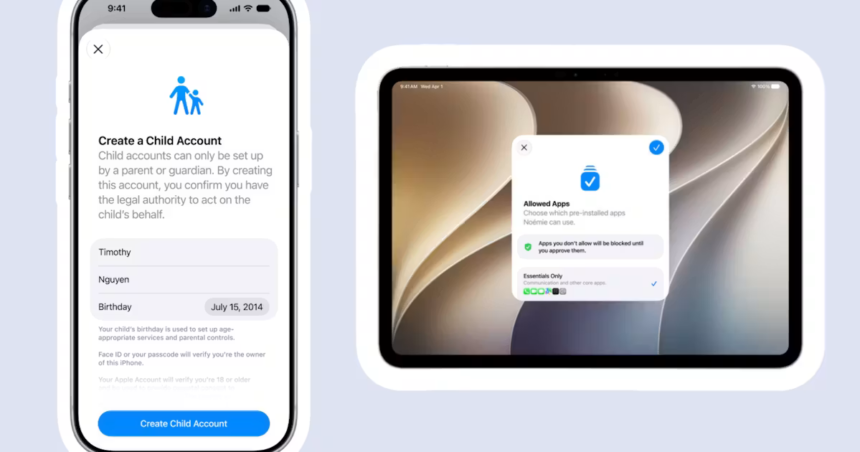
Parents today spend countless hours worrying about their children’s online safety. Access to social media is enough to connect with friends, but not enough to become an addiction. Are cell phones making it easier for us to get help when we’re stressed, or keeping us from relationships? So when tech companies make it easier for moms and dads to set boundaries on screen time and the content their kids can access, it’s just another tool in the toolbox for keeping kids safe online. And last week, Apple announced some new features for kids and families that parents should know about.
Apple announced a number of new safety and security features built into iOS at its annual Worldwide Developers Conference. This means those features are available on both iPad and iPhone. The new feature is currently in beta testing and will begin rolling out to users this fall. Here’s a DL of all the new settings and what the iPhone maker says it can support.
- Child account: When you set up your child’s device, you must create a child account. Currently required for children under 13 and available up to age 18. This will enable all other protections currently built into iOS, and will prompt parents to create a unique PIN code to check for future settings updates.
- More control over apps and content: Parents can add the app to their child’s allowed apps and enable Require Purchase. This will send a text to the parent’s device to approve or deny the app when the child tries to download the app. Next, there is the “Ask to View” feature. This requires your child to ask for permission to access new websites in Safari.
- Added security about who your child can talk to. Parents can now control who their kids can connect with by phone, FaceTime, and Messages, and request approval before accepting communications from new contacts. Communication safety features (which already blur nudity when detected in FaceTime or Messages) will also censor violence and gore. This is turned on by default for users under 18.
- When children have access to what is in your hands now. New time allowances feature gives parents more flexibility in setting screen time limits for their children. This menu provides expert guidance on the recommended amount of time for kids across entertainment, gaming, and social media apps, so you don’t have to guess what’s right. You can also set schedules to control which apps your child can access at what times throughout the week. If you need to turn everything off during class time, you can do it now.
- Screen Time makes it easy to manage access. It shows you which apps your child used most that day and how much time they spent on each app, and you can easily block access or add more time from that menu.
If you have kids with tablets or phones, you’re probably already using iOS parental controls and may have experienced bugs like settings switching randomly. According to Apple, this issue can occur when even one device in a Family Sharing network isn’t running the latest software updates because all devices communicate with each other to enforce safety settings.
An Apple spokesperson said in a press conference that the company significantly rebuilt the parental controls backend before making these updates to break off old routes that allowed children to override the controls themselves. Now, for example, if your child learns your passcode and uses it to bypass the Ask to See feature, you’ll still receive a notification on your device letting you know it’s time to change the passcode and talk to your child.
Apple has also created a new hub at apple.com/child-safety for parents to find answers to questions about all the security features at their disposal and how to implement them.